 Latch
LatchCoding agents and the CLI
Agents that support skills can use the Latch skill. Other agents can call the CLI directly. Codex, Claude Code, and other tools use the same interface.
Install the skill
Install Latch for your user account and choose from the compatible agents found on your machine:
pnpm dlx skills add Serendeep/latch --skill latch --globalTo install it for Codex and Claude Code without prompts:
pnpm dlx skills add Serendeep/latch --skill latch \
  --agent codex claude-code --global --yes
Start a new agent session after installation. The skill tells the agent when and how to request named secrets; it contains no secret values. Review its SKILL.md before installing it.
Register the project directory in the desktop app before requesting access. For a project whose server needs GITHUB_TOKEN:
latch run --project /path/to/project --env development \
  --secret GITHUB_TOKEN --agent codex -- node server.mjs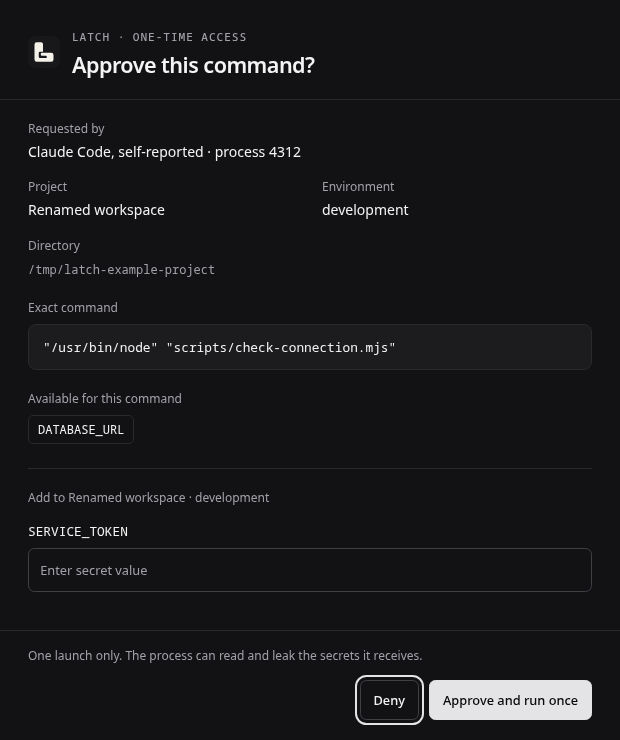
Approval scope
Repeat --secret for each required name. Never pass values as arguments. The popup shows the project, environment, exact executable and arguments, requested names, and caller label. Add missing values there, then approve one launch or deny the request.
Latch launches the executable directly with a small baseline environment and only the requested secrets. It does not capture the child's input or output. Use --shell when intentionally requesting a shell or interpreter; arguments are still passed directly.
The agent label is self-reported audit context, not proof of identity. Requests expire after five minutes. The CLI returns after launch; waiting for completion and cancelling a running job are not implemented.
When a request fails
If Latch is unavailable, start the desktop application. If the project is unknown, register its directory in the manager. Unlock the vault in the popup when prompted. A denied or expired request needs a new user decision; agents must not retry it automatically.